500K+ Spins
Spins Completed
50K+ Users
Happy Users
30+ Countries
Countries Reached
Spin Wheel of names – Free Random Name Picker & Spinner
Looking for a fast, fair, and fun way to make decisions? wheel of names is a free online random name picker that lets you spin a wheel and instantly select a winner. Whether you’re running a giveaway, teaching a class, or playing games, this wheel spinner makes every choice exciting and completely unbiased.
Why Use Our Wheel of names
100% random and unbiased results
Fully customizable wheel (names, colors, spin time)
Instant results with smooth animation
Works on mobile, tablet, and desktop
No installation required
Perfect for giveaways, classrooms, and games
How to use Wheel of names
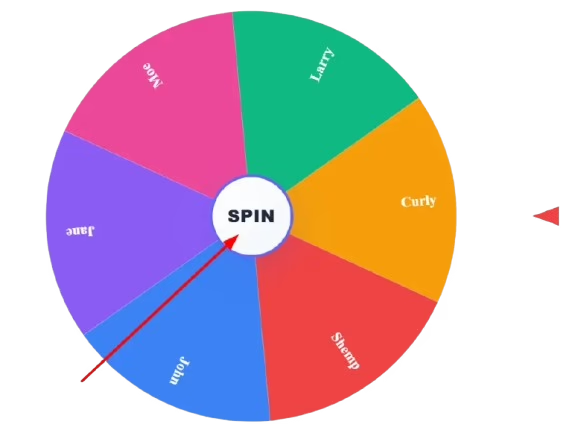
To start using the wheel, click the “spin” button located at the center of the wheel. Once you press spin, the random wheel will rotate and gradually slow down until it selects one entry. The fixed pointer on the side indicates the final result. The name aligned with the pointer when the wheel stops is the randomly selected winner.
Add Your Entries
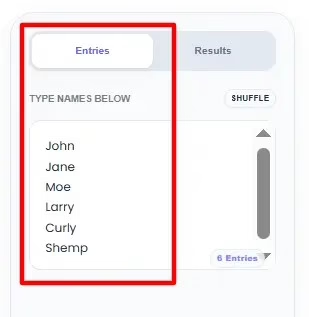
Before spinning the wheel, go to the entries tab. This is where you add, remove, or edit the names that will appear on the random spinner.
In the “Type names below” section:
Enter each name on a new line
Edit any existing entry directly in the list
Remove unwanted names by deleting the text
Scroll if you have multiple entries
View Your Spin History in Result Tab
After spinning the wheel, you can track previous selections by clicking the results tab.
The results section shows:
Manage the Selected Winner
When the spinner has finished spinning, a pop-up of a winner will appear on the screen with the chosen entry.Two options will appear for you: One is to remove winner by clicking on remove button and it will not appear in the next spin. This is useful for:
Giveaways or raffles
Classroom
Participation rounds
Team selection without repeats
Second is to click the continue button so that the selected name will continue to be the part wheel. Use this option when:
Customize the Wheel in Settings
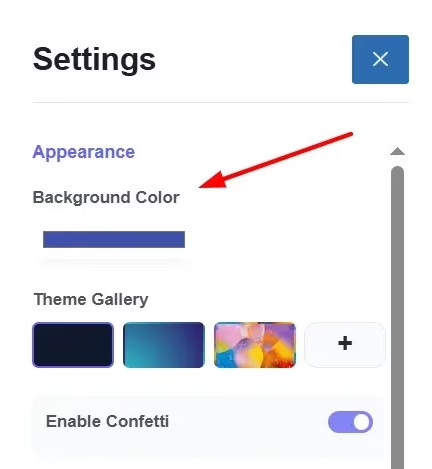
To customize the wheel you must open the setting panel. In this section you can modify the appearance and behavior of the random spinner.
🎨 Appearance
Adjust Sound & Spin Settings
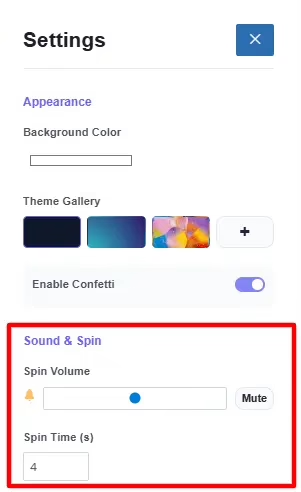
On the settings panel, scroll to the sound and spin section to determine the behavior of the spinner on each spin.
🔊 Spin Volume: Use the slider to increase or decrease the spinning sound effect. Drag left to lower the volume, drag right to increase it, click mute to turn off the sound completely. This is useful for classrooms, meetings, or live streams where you may need silent operation.
⏱ Spin Time (Seconds): Set how long the random wheel spins before stopping. Shorter time → faster results, longer time → more suspense and engagement.
Manage Entries in the Data Section
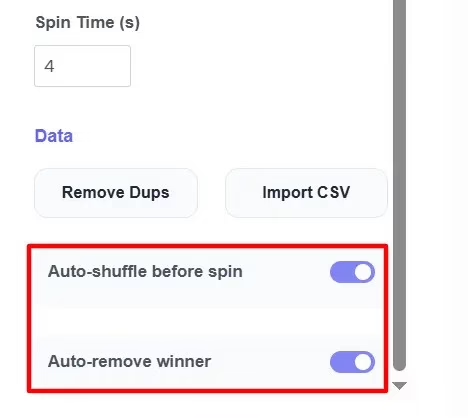
The settings panel has a data section, which allows you to manage what the spinner does with entries prior to and after a spin.
🔁 Auto-Shuffle Before Spin: Turn on auto-shuffle during spin to have the entries shuffled randomly each time you Spin.
❌ Auto-Remove Winner: Turn on auto-remove winner to automatically remove the selected name after each spin.
Popular Ways to Use the Wheel of names
Classroom & Educational Activities
Teachers use the random name wheel to:
Party Games & Social Events
Add energy and suspense to any event with a quick spin:
Meetings, Workshops & Training Sessions
A name picker wheel helps in a professional environment to:
Games & Decision Making
The wheel of names can act as:
For simple two-option decisions, try our Yes or No Wheel for instant answers or Random number generator if you want to choose random number.
Giveaways, Raffles & Promotions
Content creators and businesses often rely on this wheel spinner in order to:
Use wheel of names on any device: It is accessible on a variety of platforms, allowing you to use it on your laptop, desktop, or mobile device. Whether you’re in a classroom, office, or on the go, you can use the wheel anytime without the need to download any apps.
On iOS (Safari): Open wheel of names in Safari. Tap the share icon at the bottom of your screen. Select add to home screen and tap add. This creates a shortcut to your home screen for easy access.
On the Web: Simply access wheel of names from any modern browser (Wheelifynow.com). It’s ideal for classrooms, meetings, and live streams where you need to share your screen and manage multiple wheels at once.
On Android (Chrome): Open wheel of names in chrome. Tap the three dots in the top-right corner. Select add to home screen. Give it a name and tap add. Now you can quickly access the wheel directly from your home screen.
| Use Case | Best For | Typical List Size | Pro Tip |
|---|---|---|---|
| Classroom picks | Teachers, tutors | 10-40 students | Reuse the same list daily without removing winners |
| Raffles and giveaways | Event hosts, streamers | 20-500 entries | Use fullscreen so everyone can watch the spin live |
| Party games | Friends, families | 4-15 players | Assign a unique color per player for clarity |
| Team and task assignment | Managers, coaches | 5-30 people | Turn on winner removal so no one gets picked twice |
| Meetings and workshops | Facilitators | 5-20 attendees | Alphabetize the list first so it feels neutral |
The table lines up the five most common ways people actually use a wheel like this, and the pattern worth noticing is the “remove winner” setting, it’s the single toggle that changes the tool from a repeatable daily picker (classrooms, raffles) into a fair one-time-only distributor (team assignments, task splitting). Knowing which mode fits your situation before you start typing names saves you from re-spinning by accident.
Frequently Asked Questions
Ready to Spin?
Spin the Wheel & Pick a Name Instantly!
Related Tools
- Random Number Generator Wheel
- Yes or No Wheel Spinner
- Random Color Generator Wheel
- Random Country Generator Wheel
- Random Letter Generator Wheel
- Random Date Generator Wheel
- NFL Random Team Generator Wheel
- NBA Random Team Generator Wheel
- MLB Random Team Generator Wheel
- Random US State Generator Wheel
- Truth or Dare Wheel
- Food Wheel – What to Eat